The front desk, bookings and check in, on one screen
Every booking from the desk, the phone, your website and the booking sites lands on one calendar. Check a guest in, take the ID, move a stay and close the day without paper.
What does hotel front desk software do?
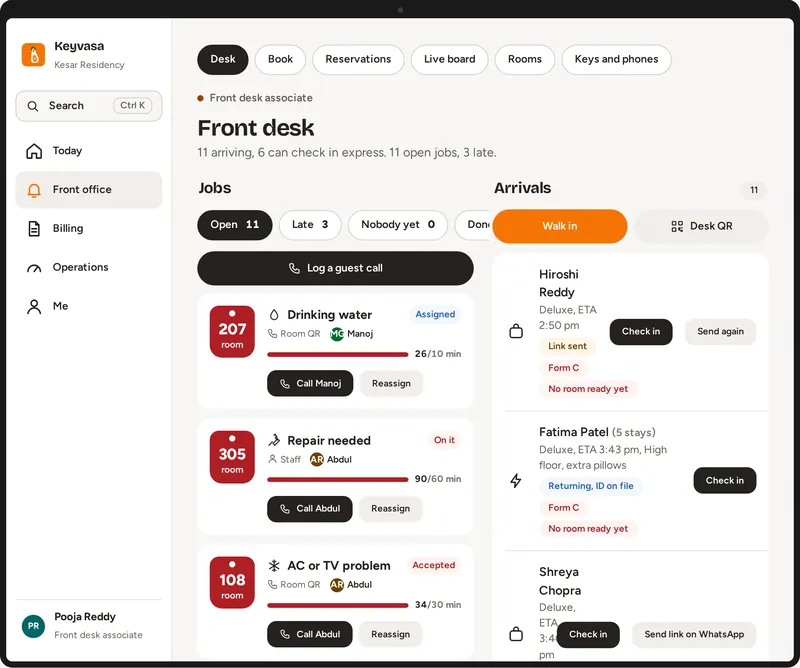
Hotel front desk software keeps every booking, room and guest in one place. Staff take walk in and phone bookings, see which rooms are free and clean, check guests in with their ID, post charges to the bill and close each day, so the owner sees the same numbers the desk sees.
How are bookings kept in one place?
Walk in, phone, website and booking site reservations all appear on one calendar with the room, the dates and the guest. Staff drag a stay to move it or extend it, and a room sold anywhere closes everywhere else when the channel manager is on, so there is no second register to keep.
One calendar
Every room and every night, with arrivals and departures for today.
Drag to move
Move or extend a stay by dragging it; the bill follows.
Express check in
Guests who checked in on their phone only show their ID at the desk.
How does check in handle guest IDs?
At check in the desk records the ID type, the last 4 characters and a photo of the ID for each adult. Staff see only the last 4 characters. Guests who used Keyvasa Concierge before arrival already have this done, so the desk checks the original and hands over the key.
Every adult
The booking shows how many adults still need an ID.
Form C register
Foreign guests are listed for reporting, keeping only the last 4 characters of the passport and visa.
Signature
The guest signs on a phone or a tablet.
What happens at the end of each day?
Each night the day is closed. Bills from yesterday cannot quietly change after the close, room nights are charged, and the morning summary tells the owner who arrives, who leaves, what money is still to collect and which rooms and jobs are still open.
Nightly day close
Yesterday’s bills are locked once the day is closed.
Morning summary
Arrivals, departures, money due and open jobs.
Audit trail
Every change is recorded with who did it and when.
The front desk, calendar and nightly day close are in every plan, from Core. See every plan
Common questions
Can I use the front desk on a phone?
Yes. Owners and managers can see the calendar, rooms and bills on a phone. A computer at the desk makes check in and billing quicker, because the full screen fits more.
Can I bring bookings from my old software?
Yes. The Keyvasa team moves your rooms, rates, guests and future bookings from your old system as part of setup, and trains your team.
Does it work for day use and hourly rooms?
Keyvasa books by the night. Ask us on the demo call about your hotel’s day use needs before you decide.
Updated by the Keyvasa team.
See it with your own hotel
A 30 minute call on your phone or computer, with your rooms and your questions. Setup, moving your data and training are included in every plan.
Request a demo
Tell us about your hotel. We will set up a walkthrough with your own room types and show the screens your team would use.
Thank you. Your request is in.
We will get in touch on the phone or WhatsApp number you gave to fix a time. Meanwhile, take the product tour.